Gnome Boxes
Contents:
- Install Gnome Boxes Version 46.0-stable (Ubuntu 46.0-1build1)
- Win10 gnome boxes setup
- Apps on Taskbar
- Cut and Paste between Host and Guest
- USB Device Passthrough Configuration
- Use virsh to confirm the status of the VMs
- Copy a Gnome Boxes Virtual Image to Archive
- VirtIO
- Loading Firmware to handhelds
- Win10 gnome boxes setup
- Spice Guest Tools on Windows
- Copy a Gnome Boxes Virtual Image to Archive
- Increase Disk Size
- WinXP 64 bit Professional VM
- Win11 VM
- Qemu
[Top][Home]
What is the technology used by Boxes?:
https://help.gnome.org/gnome-boxes/supported-protocols.html
Wikipedia - GNOME Boxes:
https://en.wikipedia.org/wiki/GNOME_Boxes
[Top][Home]
Install Gnome Boxes Version 46.0-stable (Ubuntu 46.0-1build1)
Ubuntu 22.04 install:
[Top][Home]
Win10 gnome boxes setup
Setup Issues Outstanding:
- Cut and paste not working across platforms. This is resolved after Spice is installed.
- Thetis has to capture Network interface to connect to HL2 - needs network bridge or 2nd interface.
Download Win10 iso media, Win10_22H2_EnglishInternational_x64v1.iso, from Microsoft.
Install gnome boxes and install win10 from above local .iso media.
Win10 Setup List:
- ** NOTE - Perform regular Clones and snapshots throughout this process.
- BACKUP to offsite media: Copy a Gnome Boxes Virtual Image to Archive
- Change display to 1920 x 1080
- Change Keyboard to "US" (Right hand end of taskbar)
- Unpin unnecessary apps from taskbar.
- Uninstall or Unpin apps from Start Menu (Box on right)
- Folder app --> view--> tick "File name extensions"
- Download Spice for Windows :
https://www.spice-space.org/download/windows/spice-guest-tools/spice-guest-tools-latest.exe
Spice
- Install Spice
- Install Thesis and gen FFT Wisdom file
- Download Google Chrome and install
- Install Visual C runtime from file: Visual-C-Runtimes-All-in-One-Dec-2025.zip
- Configure USB device passthrough in a virtual machine using libvirt and KVM
- Download and Install Spice Spice Guest Tools on Windows
[Top][Home]
Apps on Taskbar
These are applications that will not run on native Linux
- Command Prompt
- Device Manager
- Folder
- Chrome
- Notepad
- Thesis-x64
- OpenGd77
- Simoco-PRM
- Simoco-P25
- Anytone
- XTL-5000
- FTM400
- SDRSharp - AirSpy
- ZachTec - WSPR Desktop
- Libre Office
-
[Top][Home]
Cut and Paste between Host and Guest
to get the clipboard working you must do the following on both Host and Guest.
USB Device Passthrough Configuration
Where:
- mode: Defines the mode of the device, typically set to 'subsystem' for USB devices.
- type: Specifies the type of device, which is 'usb' in this case.
- managed: Indicates whether the device is managed by libvirt. Setting it to 'yes' allows libvirt to handle the device.
- vendor id: The unique identifier for the USB device's manufacturer.
- product id: The unique identifier for the specific USB device model.
[Top][Home]
Use virsh to confirm the status of the VMs
[Top][Home]
VirtIO
Virtual Machine Manager - virt-manager 4.1.0 (gpg)Thursday August 04, 2022:
[Top][Home]
Loading Firmware to handhelds
The firmware process is preferably performed on the Linux Platform
The objective is to enable the usb port to load the firmware.
There are two options, Zadig and STMicroelectronics
Zadig is a Windows application that installs generic USB drivers, such as WinUSB,
libusb-win32/libusb0.sys or libusbK, to help you access USB devices.
Zadig:
https://zadig.akeo.ie/
STMicroElectronics Driver:
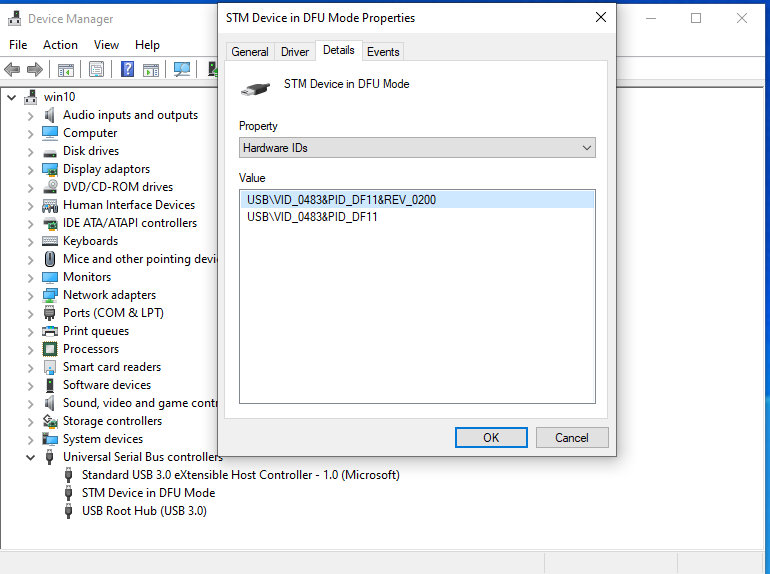
Installing CPS for Anytone D868UV:
Installing Driver for Anytone D868UV:
Installling CPS for OpenGD77:
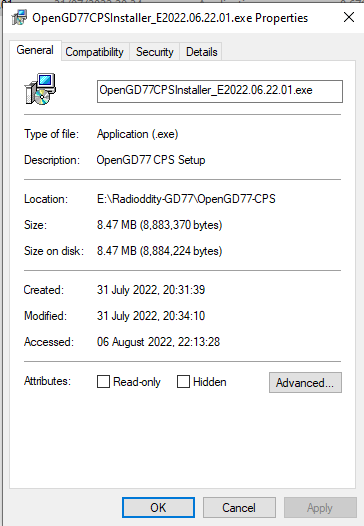
Installing Driver for OpenGD77:
Win10 gnome boxes setup
Spice Guest Tools on Windows
The SPICE project aims to provide a complete open source solution for remote
access to virtual machines in a seamless way so you can play videos, record
audio, share usb devices and share folders without complications.
Spice HOME page:
https://www.spice-space.org/download/windows/spice-guest-tools/spice-guest-tools-latest.exe
[Top][Home]
Copy a Gnome Boxes Virtual Image to Archive
Back up or move a box:
https://help.gnome.org/gnome-boxes/backup.html
- Copy the image file to the new host’s path: ~/.local/share/gnome-boxes/images/
- Copy the libvirt configuration XML from ~/.config/libvirt/qemu/
- Open the file, ~/.config/gnome-boxes/sources/' in the current system.
- Copy the section from “[display” … to end of this section) which belongs to your virtual machine and paste on new host.
[Top][Home]
Increase Disk Size
Increasing Virtual Machine Disk Size in Gnome Boxes:
https://www.jafaraziz.com/blog/increasing-disk-size-in-gnome-boxes/
[Top][Home]
WinXP 64 bit Professional VM
Download iso:
https://archive.org/download/windowsxpprox64english/Windows%20XP%20Pro%20x64%20Vl%20English.iso
Download Update:
https://www.microsoft.com/en-us/download/confirmation.aspx?id=39157
XP executables:
[Top][Home]
Win11 VM
As at July 2022 Win11 requires a great deal of hacking to made work.
Windows 11 significantly raised its hardware requirements compared to Windows 10.
Among the changes, it requires more RAM and storage space. It also requires a
Trusted Platform Module (TPM) version 2.0 and a UEFI boot environment.
GNOME Boxes doesn’t yet support TPM and UEFI environments. However, the underlying
virtualization technology supports it.
How to run Windows 11 in GNOME Boxes (with UEFI and TPM2 emulation):
https://www.ctrl.blog/entry/how-to-win1
1-in-gnome-boxes.html
[Top][Home]
Qemu
Not sure where this fits in. This became too complicated so did not persue this line of VM solution.
https://www.qemu.org/download/#linux
QEMU’s documentation:
https://www.qemu.org/docs/master/index.html
https://www.qemu.org/docs/master/about/deprecated.html
[Top][Home]
Glenn Lyons VK4PK
glenn@LyonsComputer.com.au
Ver:gnl20220807 - pre published v0.9